How-to Create vCenter Alarms on “Custom” Event
The alarms in vCenter can handle more events, then what is in the list, you just have to find the connect event sting.
the first thing is to find the connect event string, also called the “EventTypeID”.
This can be done thru Powershell/PowerCLI, in this example i am looking for the revert snapshot string.
Before this i toke a snapshot on the VM and reverted this and then deleted it.
Connect-viserver <vCenter server>
get-vm <vm name> | get-vievent -maxsample 3
This returned this result:
EventTypeId          : com.vmware.vc.VmDiskConsolidatedEvent
Severity             :
Message              :
Arguments            :
ObjectId             : vm-30321
ObjectType           : VirtualMachine
ObjectName           : VM01
Fault                :
Key                  : 25429113
ChainId              : 25429112
CreatedTime          : 10/4/2019 9:35:33 AM
UserName             : domain\admin
Datacenter           : VMware.Vim.DatacenterEventArgument
ComputeResource      : VMware.Vim.ComputeResourceEventArgument
Host                 : VMware.Vim.HostEventArgument
Vm                   : VMware.Vim.VmEventArgument
Ds                   :
Net                  :
Dvs                  :
FullFormattedMessage : Virtual machine VM01 disks consolidated successfully on esx01.domain.local in cluster Cluster01 in LAB.

ChangeTag            :
Info                 : VMware.Vim.TaskInfo
Key                  : 25429112
ChainId              : 25429112
CreatedTime          : 10/4/2019 9:35:33 AM
UserName             : domain\admin
Datacenter           : VMware.Vim.DatacenterEventArgument
ComputeResource      : VMware.Vim.ComputeResourceEventArgument
Host                 : VMware.Vim.HostEventArgument
Vm                   : VMware.Vim.VmEventArgument
Ds                   :
Net                  :
Dvs                  :
FullFormattedMessage : Task: Remove snapshot

ChangeTag            :
EventTypeId          : com.vmware.vc.vm.VmStateRevertedToSnapshot
Severity             :
Message              :
Arguments            : {snapshotName, snapshotId}
ObjectId             : vm-30321
ObjectType           : VirtualMachine
ObjectName           : VM01
Fault                :
Key                  : 25429085
ChainId              : 25429083
CreatedTime          : 10/4/2019 9:35:16 AM
UserName             : domain\admin
Datacenter           : VMware.Vim.DatacenterEventArgument
ComputeResource      : VMware.Vim.ComputeResourceEventArgument
Host                 : VMware.Vim.HostEventArgument
Vm                   : VMware.Vim.VmEventArgument
Ds                   :
Net                  :
Dvs                  :
FullFormattedMessage : The execution state of the virtual machine VM01 on host esx01.domain.local, in compute resource Cluster01 has been reverted to the state of snapshot Snapshot-test, with ID 537
 ChangeTag
Here we see three events, newest at the top, the events are “Disk consolidated successfully”, “remove snapshot” and “Reverted to snapshot”.
So from the last event vi can see the “EventTypeID” is “com.vmware.vc.vm.VmStateRevertedToSnapshot”.
We now have the information to create an alarm on this event, in the vCenter. here are some images on how to do this.
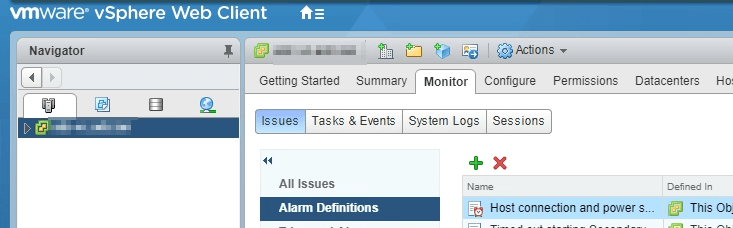
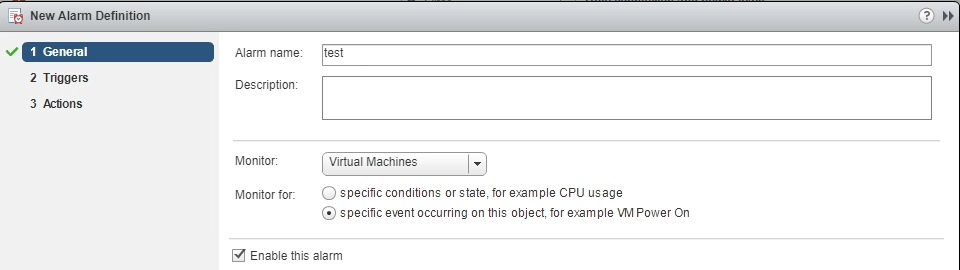

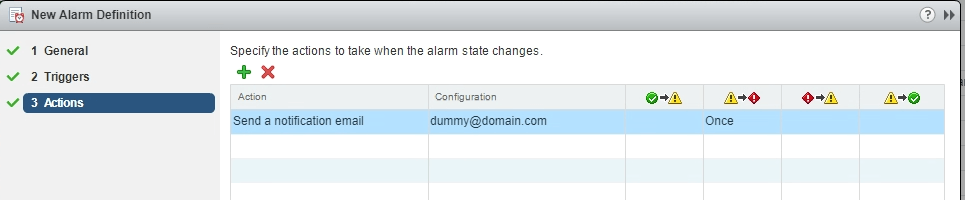
Note: when inserting the “EventTypeID” remember to press “Enter” or “TAB”, so it’s saved.
How would I create a custom alarm for when a Host is added?
HostAddedEvent is the ID
Not sure sure on the syntax.